FreeWili (DC32) · Volume 1
FreeWili (DC32) — Volume 1
Introduction
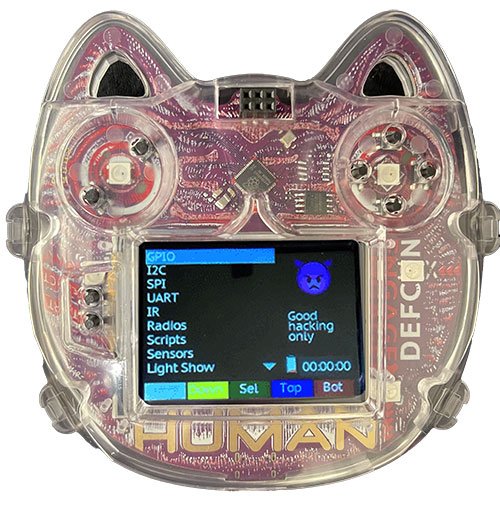
The FREE-WILi DEFCON 32 badge (Aug 2024) is unusual in the DEFCON-badge world: it’s positioned not as a single-purpose toy but as a hardware development tool that happens to be a badge. Connect it to a laptop, fire up the FREE-WILi GUI, and the badge becomes an interactive bench instrument exposing GPIO, I²C, IR TX/RX, and (on radio variants) sub-GHz / 2.4 GHz playgrounds. The same platform was reused for the DEFCON 33 ICS Village Badge with AI scripting added.
The subject here is the hardware and the three radio variants. Vol 2 covers the RP2350 platform and .uf2 bootloader workflow; vol 3 covers WebAssembly scripting and the FREE-WILi GUI surface.
📷 Hero photo:
03-outputs/figs/freewili_dc32_hero.jpg(TBD — pull from vendor product page).
1.1 Host MCU: RP2350
- Raspberry Pi RP2350 — same chip as the Pico 2 (Aug 2024 launch)
- Dual ARM Cortex-M33 cores (or dual Hazard3 RISC-V — selectable at boot) @ ~150 MHz
- 520 KB SRAM, 8 KB OTP, external QSPI flash for code
- 12 PIO state machines across 3 PIO blocks
- USB 1.1 + USB mass-storage
.uf2bootloader (the “hold BOOTSEL, drag .uf2” workflow) - HSTX (high-speed transmit) for DVI / parallel display output
1.2 Three variants — radio strategy
The badge ships in three colors/loadouts:
Table 1 — The badge ships in three colors/loadouts
| Variant | Radios | Best for | Cost / availability |
|---|---|---|---|
| Black | 2 × TI CC1101 (sub-GHz) | 315 / 433 / 868 / 915 MHz ISM band experimentation (key fobs, remote sensors, weather stations, home automation, garage doors) | Lowest |
| Red | 2 × TI CC1352P7 (sub-GHz + 2.4 GHz multi-protocol) | Thread / Zigbee / 6LoWPAN / IEEE 802.15.4 / Wireless M-Bus / Wi-SUN / Amazon Sidewalk / proprietary 2.4 GHz | Highest |
| Blue | None | Compliance-restricted environments (courts, customers’ regulated workspaces). Also cheapest. | Mid |
1.2.1 CC1101 (black variant)
- Sub-GHz only, low-cost workhorse
- Programmable filter ranges: 300–348, 387–464, 779–928 MHz
- Two of them lets you do TX + RX simultaneously, or two-channel monitoring
- SPI-attached to the RP2350
- Great for replay / capture exercises on consumer-grade sub-GHz devices
1.2.2 CC1352P7 (red variant)
- TI’s flagship multi-band / multi-protocol wireless MCU — itself an ARM Cortex-M4F with a separate radio MCU (Cortex-M0+) handling the PHY
- Sub-GHz (the same bands as CC1101) and 2.4 GHz
- The “P” suffix is the integrated +20 dBm PA variant — meaningful range
- Two of them gives genuine dual-band concurrent operation (one chip on sub-GHz, one on 2.4 GHz)
- Protocols officially listed: 6LoWPAN, Amazon Sidewalk, IEEE 802.15.4, MIOTY, proprietary 2.4 GHz, Thread, Wi-SUN NWP, Wireless M-Bus, Zigbee
Which variant is yours? — confirm and record in your CLAUDE.md. The badges look similar but the radio chips differ dramatically; programming examples in vol 2/3 should always state which variant they assume.
1.3 Display + inputs
- Touchscreen — exact controller + resolution TBD from schematic (it’s the most-referenced UI element)
- Accelerometer — TBD part number; supported by FREE-WILi GUI
- RTC — TBD part number; supported by FREE-WILi GUI
- Buttons: at minimum Reset and Bootload (the standard RP2350 BOOTSEL pair) plus additional badge buttons (count TBD from schematic)
1.4 Audio + IR
- Integrated buzzer / sound board — basic audio output
- IR transmit + receive — vendor recommends pairing with a TSOP38238 IR receiver module for RX exercises
- Use cases: IR remote learning, sub-GHz + IR combined attacks/demos
1.5 Expansion: SAO connector
- 4 GPIO on the SAO
- Two of those GPIOs double as I²C (vendor includes pull-up resistors)
- Pre-wired I²C devices on the badge bus: touchscreen, accelerometer, RTC — so SAO add-ons share that bus
- Standard SAO 4-pin (GND, +3V, SDA/Tx, SCL/Rx) — verify mechanical / pinout from schematic
1.6 Power
- USB-C (assumed; verify from schematic)
- Battery: TBD from schematic — likely a LiPo with USB charging
- Power consumption: not yet documented; RP2350 + radio loadout drives the budget
1.7 Programming model
The badge has two complementary entry points:
1.7.1 A. WebAssembly scripting via UF2
- Write a script in WASM-targetable language (AssemblyScript, Rust → wasm32, etc.)
- Build to
.uf2 - Hold BOOTSEL + plug in → badge appears as USB mass storage
- Drag the
.uf2onto the drive → badge resets and runs the script - The vendor exposes an API surface to WASM (GPIO, I²C, IR, radio); the exact API is documented at
docs.freewili.comand evolves — pin to a specific FREE-WILi GUI version
1.7.2 B. FREE-WILi GUI
- Desktop app from
freewili.com/freewili-gui/ - Connects to the badge over USB serial
- Exposes interactive control: read/write GPIO, send I²C transactions, transmit IR codes, configure radios, capture / replay
- This is the path for “I want to poke at things” rather than “I want to ship a script”
1.7.3 C. Native firmware (escape hatch)
- The RP2350 is a stock RP2350 — Pico SDK / TinyGo / MicroPython / CircuitPython all work
- Going native abandons the WASM API and the FREE-WILi GUI integration; reserve for cases where the WASM API is insufficient
1.8 What stands out
- Three variants is a smart unbundling — most badges force one radio choice on everyone
- CC1352P7 × 2 in the red variant is real engineering — that’s two flagship Sub-1 GHz / 2.4 GHz multi-protocol MCUs, not a token wireless chip
- WASM scripting is unusual for a badge — sandboxed, language-agnostic, and the same API across variants
- FREE-WILi GUI = the badge is genuinely useful as a bench tool after the conference
References
- Vendor product page: https://freewili.com/products/defcon32-badge/
- DC32 badge docs: https://docs.freewili.com/defcon-badges/defcon32-badge-edition/
- Hackaday writeup: https://hackaday.com/2024/11/21/free-wili-turns-dc32-badge-into-hardware-dev-tool/
- RP2350 datasheet — Raspberry Pi (pull into
02-inputs/research/) - CC1101 + CC1352P7 datasheets — Texas Instruments (pull selectively; both are large)
Comments (0)