CubeSat Simulator · Volume 2
The Theory — Vol 2
The Theory — Vol 2
Introduction
Vol 1 described what the CubeSatSim is and how its boards stack up. This volume explains why it works the way it does — the engineering theory behind the four things that make it a believable satellite: its power/energy budget (solar + battery, sun + eclipse), its telemetry (what it measures and how that data is framed), its modulation modes (how that data is impressed on a 70 cm carrier — AFSK, FSK/DUV, BPSK, and SSTV), its link budget (whether the signal actually closes the path to your receiver), and the Part 97 regulatory envelope that governs putting any of it on the air.
Where a statement is a project-specific fact, it is cited to a primary source. Where a statement is general engineering theory (modulation math, link-budget structure), it is presented as such — it is true of any system of this type, and it is what a reader needs in order to understand the design choices. A handful of component values that the original research pass could not confirm have since been pinned to the v2.1 schematic and BOM (Vol 4) and the usage guides (Vol 5); this volume now carries those resolved values inline and points to where each is nailed down.
1. The power & energy budget — being a satellite on a windowsill
A real LEO satellite lives on an energy budget: for roughly 60% of each ~90-minute orbit it is in sunlight and its solar panels both power the bus and recharge the battery; for the other ~35 minutes it is in eclipse (Earth’s shadow) and runs entirely off the battery. Surviving each orbit means the energy harvested in sunlight must exceed the energy spent over the whole orbit, including eclipse. The CubeSatSim reproduces this cycle on the bench: it is self-powered through onboard rechargeable batteries and solar panels,12 so shading and illuminating the panels demonstrates the same charge/discharge behavior a flight unit experiences orbit-to-orbit.
Subsystem topology
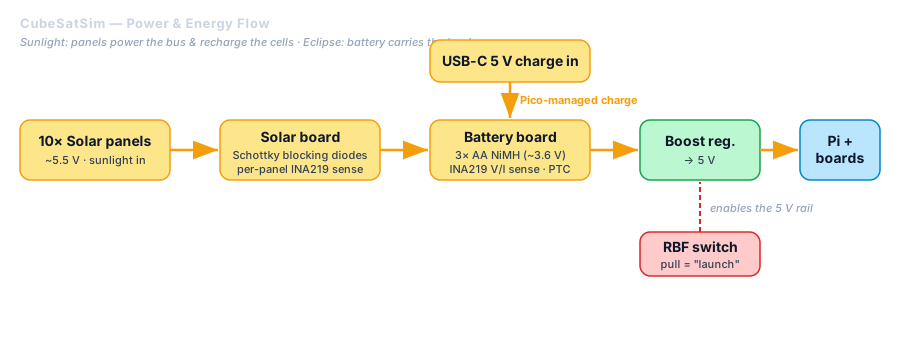
The power path is split across two of the stack’s boards: a Solar board that conditions the solar input, and a Battery board that holds the cells and manages charge/discharge, each interconnected with JST jumpers, with ten solar panels feeding the solar board.3 The energy flow is:
Solar panels (10×) ──▶ Solar board ──▶ Battery board (charge + cells) ──▶ bus regulation ──▶ 5 V to Pi & boards
                                                          ▲
                                              micro-USB 5 V charge input
The cells, charger, and regulation
The v2.1 hardware uses a 3-cell AA NiMH pack (≈3.6 V nominal, ~4.0–4.2 V freshly charged), fed by ~5.5 V solar panels, with the pack stepped up to the 5 V the Raspberry Pi requires and a USB-C 5 V charging input. Charging is managed by the on-board Pico off the USB-C rail — there is no dedicated charger IC (older descriptions citing a CN3058 do not apply to v2.1). The exact cells, shunt-monitor parts, and jumper-selected charge path are read off the schematic in Vol 4 §1d / §2.45
Two theory points are worth drawing out regardless of exact values:
- Why NiMH, not LiPo: NiMH chemistry is forgiving, non-volatile, and classroom-safe — appropriate for a device handled by students and shipped as a kit. It trades energy density (which doesn’t matter on a bench) for safety and simplicity.
- Why a boost converter: a 3-cell NiMH pack sits well below 5 V for most of its discharge curve, so a boost (step-up) converter is needed to hold the Pi’s 5 V rail steady as the battery sags — the bench analog of a satellite’s EPS (Electrical Power System) regulation.
The Remove-Before-Flight (RBF) switch
Like a real satellite, the CubeSatSim uses a Remove-Before-Flight (RBF) pin/switch that keeps the system powered off until pulled — pulling it “launches” the simulator (boots the Pi, starts transmitting).5 This is both a practical power cutoff and a teaching device: it mirrors the flight-safety convention that a satellite stays inert until deployed. The switch is on the Main board (with a Battery-board option); see Vol 4 §1d.
2. Telemetry — what the satellite says about itself
The payload that matters most is housekeeping telemetry: the satellite continuously measures and reports its own health. The CubeSatSim transmits multi-channel voltage, current, and temperature telemetry,64 the same categories a flight CubeSat reports so operators can tell whether the power system, thermal environment, and bus are nominal. It also transmits SSTV (Slow Scan TV) images from the Pi Camera,5 standing in for an imaging payload.
Telemetry framing (theory). Housekeeping data is organized into fixed frames: a frame is a defined byte layout where each field is a known channel (e.g., battery voltage, panel current, board temperature), sampled and packed on a schedule, then transmitted repeatedly. Ground software knows the layout, so it can unpack each frame back into engineering units and trend them over time. The CubeSatSim borrows AMSAT’s flight heritage here: its frames are compatible with the Fox-series telemetry that FoxTelem already understands (see modes below and Vol 5). The exact frame/field layout is defined by the project’s software and FoxTelem spacecraft-definition files; the decoded field set — Radio, Battery/Battery 2, Computer Hardware, STEM Payload (BME280/MPU6050), and the ±X/±Y/±Z solar faces — is laid out in Vol 5 §5.
3. Modulation modes — putting data on a 70 cm carrier
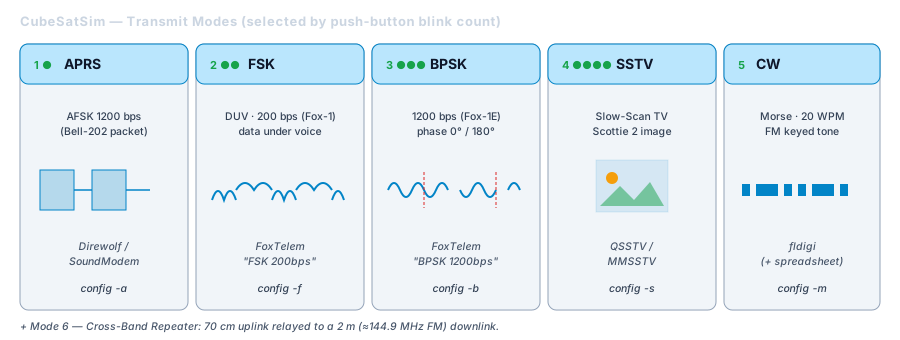
The CubeSatSim transmits housekeeping telemetry on the 70 cm ham band using AFSK, FSK, or BPSK, and transmits images via SSTV.5 It also implements the AMSAT Fox-style FSK “DUV” and BPSK emulation modes, sending through an integrated 433 MHz low-pass (harmonic) filter — the papers call it a “band-pass filter,” but the v2.1 schematic shows a low-pass design (Vol 4 §1b) — and is decodable by FoxTelem v1.09+ which added FSK/BPSK support.4 Here is the theory of each, and why a satellite would pick one.
AFSK (Audio Frequency-Shift Keying)
Data bits are first turned into two audio tones (mark/space), and that audio then modulates the FM transmitter. Because the carrier is plain Narrowband FM, any FM receiver — an HT, a scanner, an SDR in NFM — can recover the audio, and a soft-modem (Multimon-ng, an AFSK 1200 decoder) turns the tones back into bits.1 This is the most accessible mode: it is exactly how terrestrial APRS packet (1200 bps Bell-202 AFSK) works, so existing ham packet tools decode it.
- Trade-off: simple and universally receivable, but spectrally inefficient and the least robust at low SNR.
FSK / DUV (Data Under Voice)
FSK shifts the carrier (or sub-carrier) between discrete frequencies to send bits directly. AMSAT’s “DUV” (Data Under Voice) is the Fox-1 technique of sending low-rate telemetry as sub-audible FSK beneath an FM voice/transponder channel — the data rides “under” the audio passband so telemetry and a voice transponder share one downlink. The CubeSatSim emulates this Fox behavior.4
- Trade-off: lets a single FM downlink carry continuous telemetry without interrupting voice — clever spectrum reuse, at a modest data rate (~200 bps on Fox).
BPSK (Binary Phase-Shift Keying)
BPSK encodes bits in the carrier’s phase (0° vs 180°). For the same bit rate it needs less Eb/N0 than non-coherent FSK, so it is the most power-efficient / robust of the modes — which is why AMSAT’s higher-rate Fox telemetry (e.g., the Fox-1E 1200 bps BPSK format) uses it. It demands a coherent demodulator (FoxTelem) rather than a simple FM detector.4
- Trade-off: best link performance and data rate, but requires the most capable receiver/software.
SSTV (Slow Scan TV)
SSTV sends a still image as audio over the FM downlink, line-by-line, by mapping pixel brightness/color to audio frequency over several seconds to a couple of minutes per frame. It is the CubeSatSim’s “imaging payload” downlink, decodable with standard SSTV software (e.g., QSSTV).5
- Trade-off: delivers actual pictures over a plain FM channel, but slowly and at low resolution.
Mode selection. The simulator exposes these as selectable modes via a push-button blink-count scheme — press and hold, release on the Nth green-LED blink to pick mode N. The full six-mode mapping (these four modulations plus CW and a Cross-Band Repeater), the per-mode config commands, and the SSTV sub-format (Scottie 2) are documented in Vol 5 §3.
4. Link budget — does the signal actually get there?
A link budget is the accounting that decides whether a receiver can hear a transmitter: it sums gains and losses from the transmitter’s power output to the receiver’s detector and checks that the result clears the signal-to-noise ratio (SNR) the chosen modulation needs.
The canonical form (decibels):
Prx = Ptx + Gtx − Lpath − Lmisc + Grx        [dBm]
Link margin = Prx − Rx_sensitivity(mode)      [dB]   (must be > 0, with margin)
where Ptx is transmit power, Gtx/Grx are antenna gains, Lpath is free-space path loss, and Lmisc covers cable/connector/polarization losses.
Free-space path loss grows with distance and frequency:
FSPL(dB) = 20·log10(d) + 20·log10(f) + 32.44 (d in km, f in MHz). At 70 cm (~435 MHz) this is the dominant term for a real orbit (hundreds to ~2,000 km of slant range) — but for the CubeSatSim on a bench or across a field it is tiny, which is exactly why the sim closes its link easily at low power into a nearby antenna.
Why each mode wants a different margin. The Rx_sensitivity(mode) term is where the modulation theory in §3 pays off: for the same data rate, BPSK needs the least received power, FSK/DUV more, and AFSK-over-FM the most. So as you move a receiver farther away (or shrink the antenna), the modes drop out in that order — a hands-on demonstration of the Eb/N0 hierarchy.
Note: the CubeSatSim’s transmit power is now known from the schematic — ≈10 mW in the default attenuated setting, ≈500 mW in high-power (17 dB attenuator, cut JP11; Vol 3 §4 / Vol 4 §1b). Antenna gain is the remaining variable (it depends on the SMA whip/antenna you fit and is best measured); the framework above is the general theory you apply once that is in hand.
5. The regulatory envelope — Part 97 and the 70 cm band
Transmitting the CubeSatSim over the air (not into a dummy load/shielded enclosure) puts a signal in the 70 cm amateur band, which in the US is governed by FCC Part 97.7 The practical envelope:
- License required. Operating an amateur transmitter requires a US amateur license; 70 cm privileges are available to Technician class and above. The CubeSatSim asks for your callsign during software install precisely because it must identify the station.1
- Station identification. Part 97 requires station ID at the end of, and at least every 10 minutes during, a communication. The CubeSatSim satisfies this by opening every transmission with a CW (Morse) ID — “de
” — before telemetry.1 - 70 cm band plan. The US 70 cm allocation is 420–450 MHz; the sim’s default 434.900 MHz sits in the region used for satellites/experimental/data and is a sensible default, but the band is shared (including with Part 18 ISM around 433 MHz) and subject to regional band plans and the secondary status of amateurs on parts of 70 cm.89 Choose a clear frequency and respect the local band plan.
- Content/encryption rules. Part 97 forbids encrypted content and certain uses; plain telemetry, CW ID, and SSTV imagery are all fine.
Cross-references (don’t re-derive): the full frequency-planning / license-envelope treatment lives in
../../Scanners_and_Radios/02-inputs/volume_sources/vol4.md(Part 97 / 95 / 90 with explicit RX-vs-TX rules), and the deep regulatory + RF-safety treatment in../../Hack Tools/Antennas/02-inputs/volume_sources/vol31.md. Field-use sections of this deep dive should link there.
Where the specifics are pinned down
This is the theory volume; the project-specific numbers it references are nailed to primary artifacts elsewhere in the deep dive:
- Vol 3 (Build) — the v2.1 BOM and build notes give the real part numbers and the power-subsystem parts.
- Vol 4 (Schematics) — the v2.1 schematic PDFs give the actual circuit, from which the RF chain (≈10/500 mW, low-pass filter), sensing, and Pico-managed charging are read directly.
- Vol 5 (Usage) — the Quick Start and Ground Station guides give the six-mode blink mapping, the FoxTelem telemetry format strings, and the decoded field set.
References
Footnotes
-
“AMSAT CubeSatSim” (Paper 7) — https://cubesatsim.com/content/CubeSatSimPaper7.pdf (self-powered batteries+solar; 434.900 MHz NFM; ~30 s boot then CW “de
” then telemetry; callsign entered at install). ↩ ↩2 ↩3 ↩4 -
CubeSatSim project site — https://cubesatsim.com/. ↩
-
CubeSatSim Wiki — Kit — https://github.com/alanbjohnston/CubeSatSim/wiki/Kit (Solar + Battery boards with JST jumpers; “Solar Panels (10x) with JST connectors”). ↩
-
“AMSAT CubeSatSim” (Paper 5) — https://cubesatsim.com/content/CubeSatSimPaper5.pdf (FSK DUV + BPSK Fox emulation; 433 MHz band-pass filter; FoxTelem v1.09 FSK/BPSK support; power subsystem). ↩ ↩2 ↩3 ↩4 ↩5
-
AMSAT HARC Presentation — https://www.cubesatsim.org/pres/AMSAT_HARC_Presentation.pdf (AFSK/FSK/BPSK + SSTV on 70 cm; power subsystem; RBF; ground-station BOM). ↩ ↩2 ↩3 ↩4 ↩5
-
CubeSatSim GitHub Wiki — https://github.com/alanbjohnston/CubeSatSim/wiki (“Multi-channel voltage, current, and temperature telemetry transmitted in the Amateur Radio UHF band”). ↩
-
FCC Rules, 47 CFR Part 97 (Amateur Radio Service) — https://www.ecfr.gov/current/title-47/chapter-I/subchapter-D/part-97. ↩
-
“What frequency do I use on 70 centimeters” — https://www.hamradioschool.com/post/what-frequency-do-i-use-on-70-centimeters (70 cm band plan primer). ↩
-
AMSAT CubeSat licensing notes — https://www.amsat.org/wordpress/wp-content/uploads/2018/04/AMSAST_CubeSat_Licensing.pdf. ↩